Understanding Network Devices
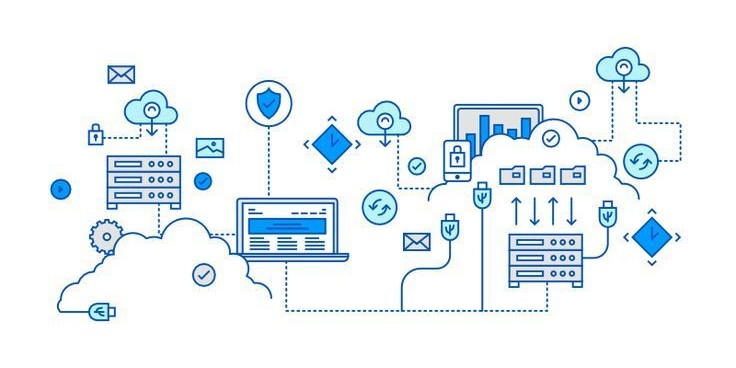
Internet from an eagle's view
From a broad perspective, the internet that reaches our homes and offices is distributed globally through massive fiber optic cables buried beneath the land and sea.
Whenever you request something online, your device sends a signal to your router, which then sends it to the modem, and out through the ISP’s network, across the internet backbone (which consists of fiber optic cables). The data is then found and returned to your device in the same way.
Common Types of Networking Devices
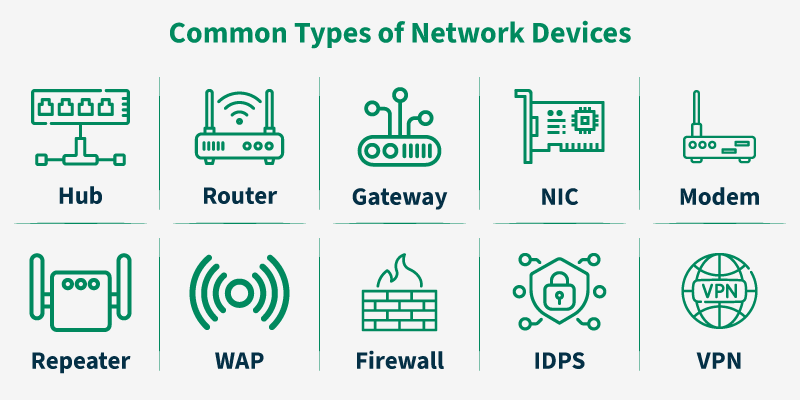
Hub, an older device that connects all devices but broadcasts all data to every connected node, making it inefficient.
A router connects multiple computer networks, such as your home devices, to the internet by forwarding data packets between them.
Gateway connects two networks with different protocols and acts as a translator for communication between them.
NIC (Network Interface Card) is a hardware inside the device that provides the physical connection to the network.
Modem converts digital signals from your computers to analog for cable lines and vise versa, enabling internet access.
Repeater boosts, regenerates or amplifies weak signals to extend the transmission distance across the network.
WAP (Wireless Access Point) acts as a bridge between a wired ethernet network and wireless WiFi devices, enabling wireless connection.
Firewall acts as a security guard, it controls incoming and outgoing traffic based on security rules.
IDPS (Intrusion Detection and Prevention System) detects any malicious activity and takes automated actions to block any threats.
VPN (Virtual Private Network) creates a secure, encrypted connection over a public network, allowing users to browse and access private networks securely hiding their IP address.
Hub vs. Switch (Local Network Management)
Hub: A basic device that connects multiple computers. It operates at the physical layer, broadcasting all incoming data packets to every connected port, which can lead to high traffic and lower efficiency.
Switch: A more intelligent device than a hub. It learns the MAC addresses of connected devices and sends data packets only to the specific recipient, reducing unnecessary network traffic.
Router vs. Modem (Internet Connectivity)
Modem: The bridge between your home and your Internet Service Provider (ISP). It translates incoming analog signals from the ISP into digital signals for your local network, and vice versa.
Router: Connects your local network (LAN) to the internet (WAN) or multiple networks together. It directs data packets to their proper destination using IP addresses, offering enhanced security, such as firewalls.
Network components can be understood through daily analogies: routers act as traffic police directing data, firewalls serve as security gates checking credentials, NAT operates like a toll booth enabling multiple cars to use one ticket, and ISP servers function as post offices sorting and delivering information packets.
Router (Traffic Police): Similar to traffic police directing cars at an intersection, a router inspects incoming data packets and directs them to the fastest or most appropriate path toward their destination.
Firewall (Security Gate): A firewall acts like a security guard at a gated community, checking the credentials (IP address, port) of data packets. Only authorized traffic is allowed through.
NAT/Router (Toll Booth): Network Address Translation (NAT) works like a toll booth. Multiple private devices (cars) share a single public IP address (ticket) to access the internet, allowing efficient resource sharing.
ISP/Server (Post Office): An Internet Service Provider (ISP) or email server acts like a post office, sorting, routing, and delivering data packets to the correct address based on IP protocols, similar to mail delivery.
Firewall
A firewall is a fundamental network security system—available as both hardware and software—that acts as a barrier between a trusted internal network (like a home or corporate network) and untrusted external networks (like the internet). Its primary function is to monitor, filter, and control incoming and outgoing network traffic based on a predetermined set of security rules, allowing only legitimate traffic to pass through while blocking harmful, unauthorized access.
Why Security "Lives" in the Firewall
Perimeter Defense: It sits between your devices and the outside world, stopping hackers, bots, and unauthorized users from accessing your network resources.
Traffic Filtering: It inspects data packets for malicious content, such as viruses or malware, before they can infect your systems.
Insider Threat Mitigation: Modern firewalls can also monitor outbound traffic to stop suspicious activity from within the network, such as data theft.
Rule Enforcement: It enforces strict, customizable security policies (e.g., blocking access to dangerous websites or restricting certain applications).
Load Balancer
A load balancer is a device (software or hardware) that acts as a "traffic cop," sitting in front of servers to distribute incoming network traffic across multiple backend servers. It ensures no single server becomes overwhelmed, enhancing application performance, reliability, and availability.
Why Scalable Systems Need Load Balancers:
Scalability & Performance: As traffic grows, load balancers allow for the seamless addition of more servers (horizontal scaling) to distribute the workload, maintaining fast response times.
High Availability & Fault Tolerance: If a server fails, the load balancer detects this via health checks and instantly reroutes traffic to healthy, functioning servers, preventing downtime.
Optimal Resource Utilization: By distributing traffic based on algorithms (e.g., Round Robin, Least Connections), they ensure no single server is overworked while others are idle.
Simplified Maintenance: They facilitate maintenance by allowing traffic to be directed away from a specific server for updates without interrupting user experience.
In a real-world setup, network devices work together hierarchically to transmit data, typically connecting user devices to a switch or wireless access point (WAP), which then connects to a router, modem, and finally the Internet. Devices like computers, phones, and servers use network interface cards (NICs) to communicate, with switches managing local traffic, routers bridging different networks, firewalls protecting them, and modems converting signals.